
UX Designer Job Search: Apply with Proof in Hand
UX designer job search is the one part of DesignPath still being built. When it opens, it will read roles against the profile the product already keeps on you: your target role, your level, the goal you came here with. What is worth doing in the meantime is the part it will draw on.
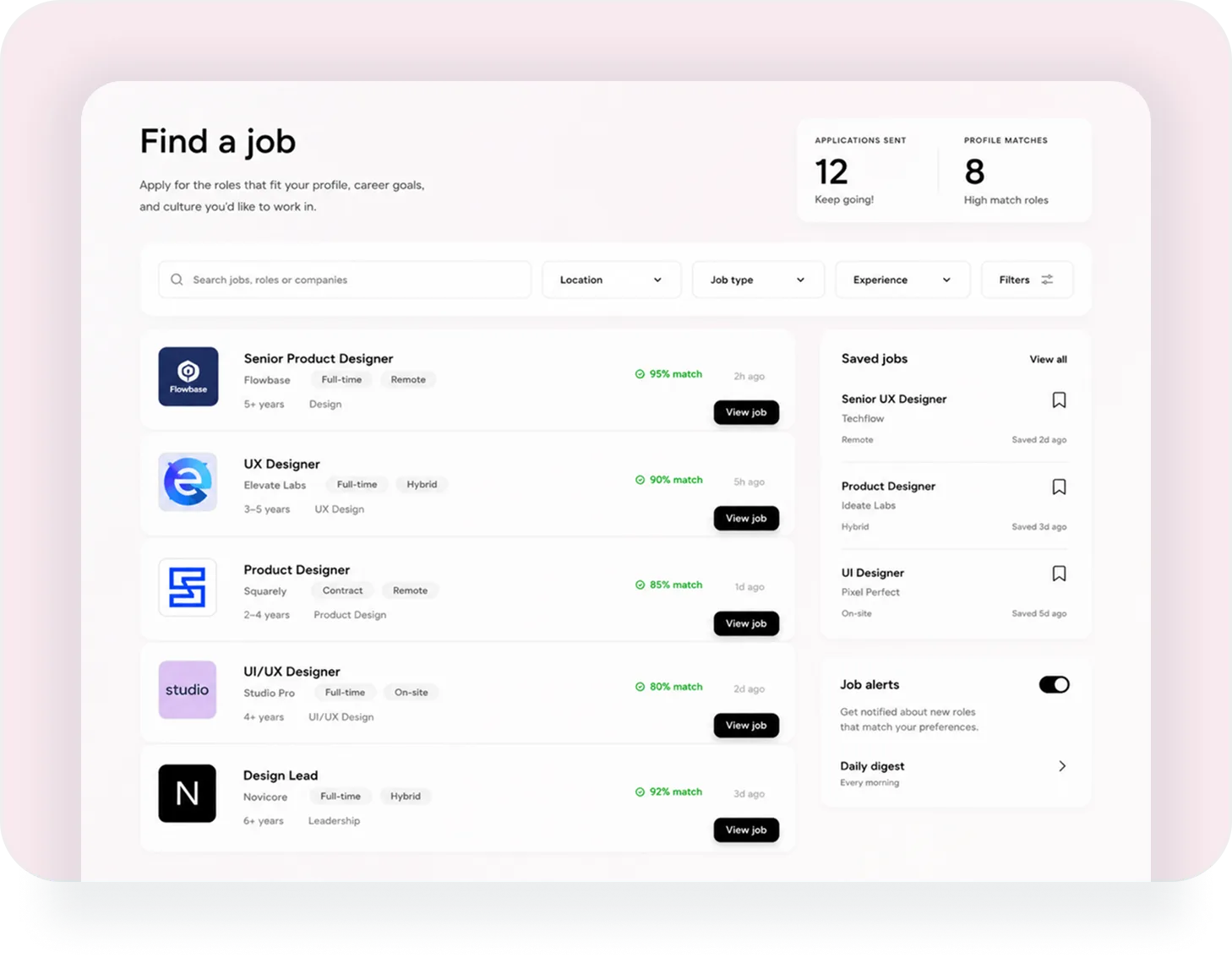
What Is Being Built
Read the four points below as a plan rather than a feature list, because that is what they are. They describe the screen above, which is as far as this part has got.
Roles Read Against Your Profile
Each opening carries how well it fits what the product already knows about you, so a list of forty is read from the top rather than from the newest.
Filters Designers Actually Use
Location, job type and years of experience, over roles named the way they are advertised: Product Designer, UX Designer, Design Lead.
Saved Roles and Sent Applications
What you bookmarked and what you sent, both counted, so a search that runs over three months does not live in twenty browser tabs.
Alerts and a Morning Digest
New roles matching your preferences arrive as a notification, or once a day as a digest, whichever suits how closely you are looking.
The Profile It Will Read From Already Exists
Onboarding asks two questions that decide everything after it: which role you are heading for, and why. The role is one of 6 - Product Designer, UX/UI Designer, UI Designer, UX Researcher, Graphic Designer, Motion Designer - and it is paired with one of 4 levels from Junior to Lead. The why is a career goal: landing a first job, switching into design, preparing for interviews, negotiating salary, building a portfolio.
Those two answers already steer your growth plan and the target line on your competence chart. A job search built on the same pair inherits a profile that has been kept current by the work you did, without a separate form to fill in when you decide to start looking.
Three Things Worth Having Ready
A job search is short and the preparation for it is long, which is the wrong way round for anyone who starts preparing on the day they start looking. These three are live in the product now, and each one takes weeks rather than an evening.
A Skill Picture You Can Point At
The assessment scores you across nine categories and 51 named skills, then draws that shape against what your target role expects at your target level. It is also the answer to the interview question about your weak spots, given as a chart instead of a guess.
ui ux skills assessmentCases with Your Own Work in Them
A finished practice task or a project of your own becomes a structured case: the problem, the decisions, what changed. That is the part of an application nobody can put together for you the week before applying.
How cases are builtCertificates That Go on a Profile
Finishing a mini-course earns a certificate with your name, the hours behind it and a credential ID, issued by DesignPath. LinkedIn takes it through their Add to profile flow, so it files under certifications rather than as a post that scrolls away. Sharing it is part of Premium.
What This Page Is Not Promising
No date, because there is not one to give. No placement, no introductions to companies, and no claim that a certificate substitutes for work someone can look at. What the product does today is get you to the point where an application has something in it: a chart that says where you stand, cases that show how you think, and a review from someone who read the work before a recruiter did.
Be Ready Before It Opens
Ten minutes of assessment is enough to see which gap to close first.
Questions People Ask
When does it launch?
There is no date to give, and inventing one would be worse than saying so. The design is finished, which is the screen at the top of this page, and the build has not started. It will open inside the product, so an account made today has it when it lands.
Is there a waitlist to join?
Not as a separate list. Signing up is the whole of it: the job search opens for accounts that already exist, and there is nothing to be early for beyond having your cases and your skill chart in place when it does.
What will the matching run on?
The profile the product already builds: one of 6 target roles at one of 4 levels, your scores across nine skill categories, and the career goal you picked at onboarding. That is the same profile your growth plan is built from, so it stays current on its own as you work.
Do I have to wait for this to get value out of DesignPath?
No. Everything the job search will draw on is live now: the assessment, the growth plan, practice tasks, mentor reviews, portfolio cases and certificates. This one page is the only part of the product still ahead of itself.
Will DesignPath apply on my behalf?
No. The design is a place to find roles worth applying to and to keep track of the ones you sent. What you send, and what you say in it, stays yours.