
UX Portfolio Case Studies: Write the Case While the Work Is Fresh
UX portfolio case studies start as a draft here: pick the sections your project actually has, replace the placeholders with what you did, and the draft comes out of your own words. Then you lay it out block by block, in the same app you did the work in.
Two Kinds of Work, One Portfolio
A case starts from something you already made. That is either a practice task you finished inside DesignPath, or a project you brought with you. Both end up in the same list, and the portfolio’s own filter is the only place they are told apart: Exercises, from practical tasks, and Custom Projects, built from scratch.
From a Finished Task
Every practice task ends on a portfolio step. The brief, what you submitted and the notes you kept while working are handed to the generator, so the case opens with material in it rather than a blank field.
From a Project of Your Own
Freelance work, a side project, a redesign of an app you use every day. You describe it once and upload the screens, and it runs through the same generator and the same builder. Nothing requires the work to have come from here.
Pick the Sections Your Project Has
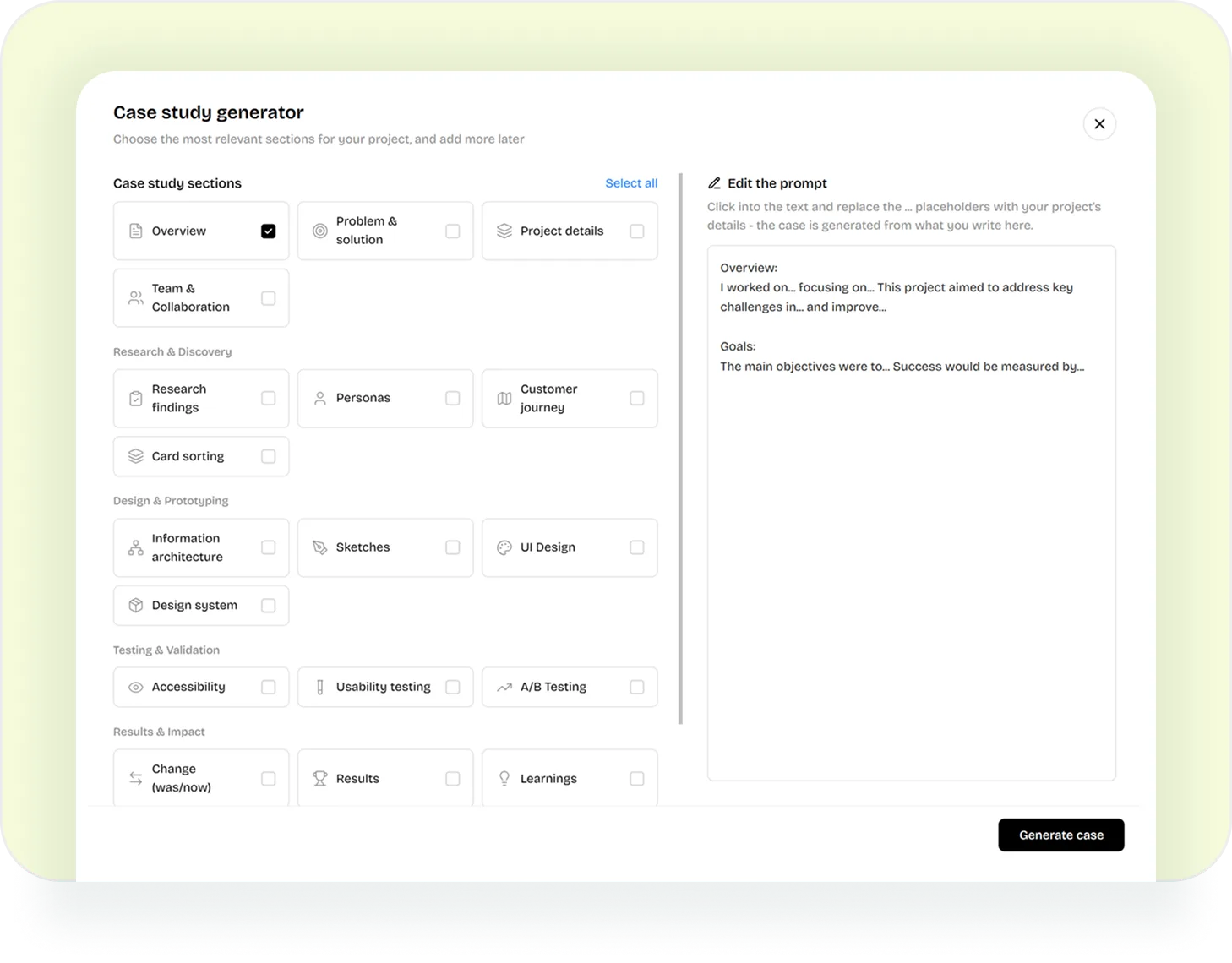
The generator opens on twenty sections in five groups, with Overview and Goals already ticked and a Select all if you want the lot. Its own instruction is to choose the ones that fit and add more later, which is the part worth taking seriously: a case with four sections you can defend reads better than one padded out to fifteen.
Project Basics
- Overview
- Problem & solution
- Project details
- Team & Collaboration
Research & Discovery
- Research findings
- Personas
- Customer journey
- Card sorting
Design & Prototyping
- Information architecture
- Sketches
- UI Design
- Design system
Testing & Validation
- Accessibility
- Usability testing
- A/B Testing
Results & Impact
- Change (was/now)
- Results
- Learnings
- Outcomes and impact
- Goals
Each one you tick arrives as a sentence with gaps in it. Problem & solution opens as “The problem I was solving was... and the solution I designed was...”, and you replace the dots with what happened on your project. That text sits in the panel on the right of the screen, editable, and it is the whole input the case is written from.
“Click into the text and replace the ... placeholders with your project’s details - the case is generated from what you write here.”
Every Section Lands as a Block You Can Move
The generated case opens in the builder. Each section is a block with a layout you can swap and a position you can drag, and the blocks that carry images are the ones that make a design case worth opening.
Text, in One to Three Columns
Swap a section between a single column, an asymmetric pair and three across, without rewriting it.
A Strip of Numbers
Two, three or four metrics across, each with its own label, for the results a case turns on.
Images, Full Width or Paired
A full-bleed shot, a two-column pair for a before and after, or a masonry grid for a set of screens.
Three Mobile Screens
Phone frames for app work, so a mobile flow is shown at the size it is used at.
An Image Carousel
A scrollable gallery for a stage that produced more screens than the page has room to lay flat.
A Live Figma Prototype
The prototype embedded in the case, clickable, for the flow you would rather have read than described.
Text is edited where it stands, with the formatting you expect and images dropped into place. A preview switch checks the page at desktop, tablet and phone width before you call it done.
Or Compile a Prompt and Let Claude Design It
BetaThe same portfolio page offers a second route, for when a template layout is not what you want. A chat interviews you about the work and about the look you are after, then compiles one prompt you paste into Claude. Claude designs the page, you import it back, and it is saved as a case alongside the others.
Project Details
A chat asks about the work one question at a time: what triggered it, what you owned, the constraints, what changed afterwards. Then it asks how the page should look, and which portfolios you like.
Prompt
The answers are compiled into a single build prompt, with your facts written out section by section and the style described in words. You copy it in one click.
Import
Claude builds the page from that prompt. You bring it back as a file or a link, and it is saved to your portfolio next to the rest.
The interview is strict about one thing, and it is the thing that makes a portfolio hold up in an interview.
“The case may only contain what I actually did. Never invent research, metrics, participants, or project phases.”
Two creations on this route are free, and after that it is part of Premium. The case builder itself stays open either way.
A Case Is Only as Good as the Work Under It
Nothing here writes a portfolio for someone who has not designed anything. What it takes out is the month of rewriting between finishing a project and having something to show for it, which is where a lot of portfolios stall. The material still has to come from somewhere, and inside DesignPath that is practice and the feedback on it.
Turn the Last Thing You Made Into a Case
Pick the sections, say what you did, and edit it where it stands.
Questions People Ask
Do I need a finished project to start?
No. A practice task counts, and every one of them ends on the portfolio step. If you already have work of your own, freelance or a side project or a redesign of something you use daily, that runs through the same generator as a custom case.
Does it write the parts I do not have?
Sections you never tick are not written at all, so a long list is not pressure to use it. What each section says comes from the text you put in the prompt panel, and the instructions behind the Claude route go further: the case may only contain what you actually did.
How much of it is mine?
The draft is generated from the text you put in the prompt panel, so it carries your facts and your wording. After that the case is yours to edit: every block is editable in place, the layouts swap, and blocks move up and down.
Can I put my own screens in?
Yes. Images upload straight into the image, gallery and mobile-screen blocks, and a Figma prototype can be embedded as a block of its own. The preview switch checks the result at desktop, tablet and phone width.
What does it cost?
The case builder is part of the free plan, with no cap on how many cases you generate. The Claude prompt route is in beta and gives two free creations before it asks for Premium.